
A notarized application includes a signature that a notary handles through the required notarial act. Depending on the form, the applicant may acknowledge a signature or sign under oath. The receiving agency decides what its application needs, including whether it accepts online notarization.
Before booking a session, check the current form, its instructions and the submission deadline. Those details help the notary identify practical requirements before you sign. They also help you avoid paying for a service that does not match the recipient’s rules.
Notary Public Center can discuss your document and the available signing arrangements. The six tips below explain what to clarify, with particular attention to Florida remote online notarization, also called RON.
What a notarized application establishes
A notary verifies identity and performs the act described in the notarial certificate. For example, an acknowledgment records the signer’s acknowledgment of execution. A jurat involves an oath or affirmation and signing in the notary’s presence.
However, the seal does not prove that every statement in an application is true. Nor does it establish the applicant’s eligibility for a license, loan or benefit. The applicant remains responsible for the information, while the receiving organization reviews the application on its own terms.
Notarization also does not guarantee approval. An agency can still find missing evidence, an outdated form or an unmet requirement. Therefore, the application and the notarial act both need attention before submission.
1. Confirm that the recipient needs notarization
Start with the instructions for the exact form you plan to submit. A licensing board may require a sworn statement, while another organization may accept a declaration without notarization. Do not assume that all forms within the same industry follow one rule.
Likewise, an application package may contain several documents with different requirements. A supporting consent or affidavit may need notarization even when the main application does not. Identify the page and signature at issue before arranging the appointment.
Use the current form and its own instructions
Check the version supplied by the receiving agency. Then compare its title and revision information with the copy you already have. A familiar form name does not establish that an older download remains acceptable.
If the instructions are unclear, ask the recipient to clarify the required act and format. For example, does it need an acknowledgment, a sworn signature or a particular certificate? A notary who is not an attorney cannot choose a legal solution for you.
The State Department’s DS-3053 instructions show why form-specific review matters. This document concerns parental consent for a child’s passport; it is not the passport application itself. The instructions address signature timing, identification copies and a 90-day consent period. They also describe circumstances involving other evidence or consent arrangements.
2. Prepare the complete notarized application
Gather the entire document and the attachments relevant to the signing. Check that names, dates and page references agree across the package. In addition, flag any difference between the applicant’s name and the identification before the appointment.
Resolve incomplete applicant sections with the issuing agency or an appropriate adviser. Do not place “N/A” in every empty field by default. Some spaces belong to the notary or agency, and the form may prescribe a different response.
Florida generally prohibits notarizing a signature on an incomplete or blank document, subject to specific statutory exceptions. See Florida Statutes section 117.107. Consequently, unresolved material blanks can prevent the session from proceeding.
Clarify who will sign and in what capacity
If you intend to act for a company or another person, explain that role before booking. The receiving agency must permit the proposed representative signature, and the document must support it. Simply possessing a power of attorney does not answer every question about authority.
Also, an agent cannot automatically take another person’s personal oath. Ask a qualified attorney when the distinction affects your application. The notary can then arrange the authorized act with the correct person and certificate.
3. Check whether online notarization fits
Remote online notarization uses authorized audio-video technology and an electronic document. It involves more than sending a signed scan or joining an ordinary video call. The notary must follow the applicable state’s requirements for the act.
Under Florida Statutes section 117.265, the online notary must be physically in Florida. The signer may be elsewhere, subject to the legal requirements. However, that permission does not establish that every foreign agency accepts the resulting electronic document.
Before choosing this format, confirm the recipient’s electronic-signature and delivery rules. Ask whether it accepts the completed electronic file or requires a different document format. Our guide to online notary USA requirements discusses Florida RON in more detail.
Discuss practical limits before the session
Tell the service provider where you will be and whether anyone else must participate. Also mention any witness requirement, language need or difficulty using a camera. These details can affect whether the proposed session works.
A reliable connection helps, but technology alone does not establish eligibility. Likewise, successful identity screening does not settle the recipient’s acceptance rules. Treat those as separate checks when planning your notarized application.
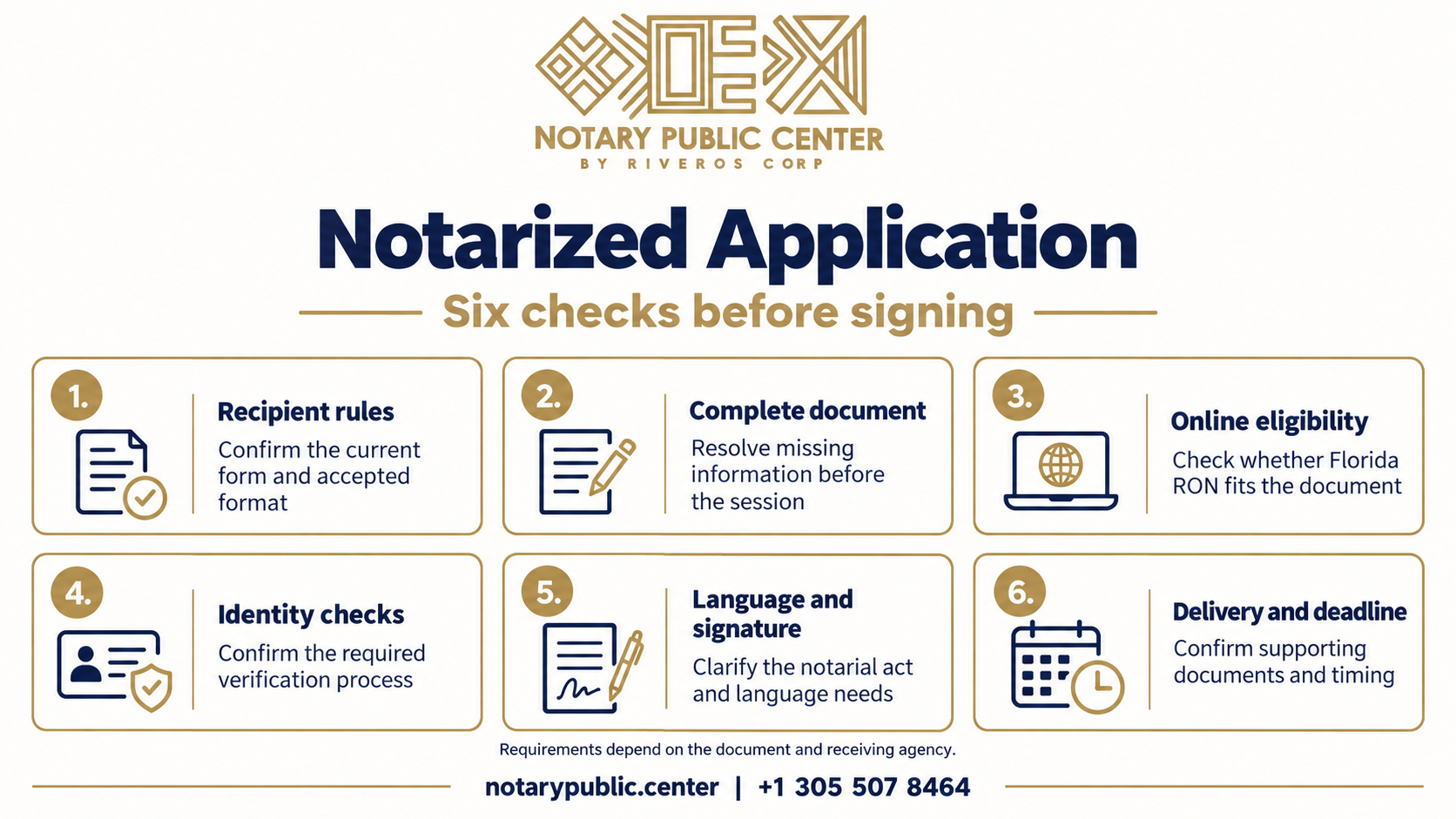
4. Confirm the required identity checks
Florida RON does not give every applicant a free choice among KBA, a selfie or showing identification on video. The statute permits identification through the notary’s personal knowledge or through the required verification process.
That process combines remote presentation of government-issued identification, credential analysis and identity proofing. Therefore, displaying an ID to a notary during a first video meeting does not, by itself, replace the other requirements.
Our guide to arranging a notary appointment can help you frame the initial inquiry. Still, confirm your specific identification with the provider before relying on a particular route.
Raise identification difficulties early
Explain whether you have a foreign-issued passport, a name difference or limited records for identity questions. The provider needs to assess the applicable requirements and available technology. Neither a passport nor the absence of a Social Security number guarantees a particular alternative.
If verification fails, ask what options are actually available for your document. Another lawful arrangement may require more time or an in-person appointment. Do not assume that a notary can waive a required check because a deadline is close.
5. Clarify language and signature timing
Tell Notary Public Center whether you need assistance in English or Spanish when discussing the appointment. The notary must be able to conduct the act properly, and you must understand what you are signing. A document in another language may also raise translation questions.
For example, Florida law addresses acknowledgments by people who do not understand English. It requires translation of the instrument’s nature and effect into a language the person understands. Separately, the recipient may require a written translation of the document.
A bilingual conversation does not automatically satisfy a certified translation requirement. Our article on documents and certified translations explains that distinction in the context of birth records. Confirm the rules for your own application.
Ask about an existing signature before changing it
An acknowledgment can concern a signature made earlier, provided the required acknowledgment and appearance occur. By contrast, a jurat requires signing in the notary’s presence and an oath or affirmation. The form’s own instructions may impose additional conditions.
If you already signed, tell the notary before the appointment. Do not cross out dates or alter the signature area without checking the instructions. For instance, DS-3053 directs applicants to complete a new form if they make an error.
6. Plan delivery and any additional services
Ask how you will receive the completed notarized application and how the recipient expects submission. An electronic file, a printed copy and an original paper document can serve different purposes. Printing a digital seal does not automatically create the paper document a recipient requires.
For international use, find out whether a translation, apostille or other authentication is necessary. These requirements depend on the document, destination and receiving authority. Not every overseas submission needs every service.
Notary Public Center can discuss the coordination your document may need. However, confirm the scope, timing and delivery arrangements before booking. Avoid planning around promises of instant delivery or guaranteed agency acceptance.
Keep the deadline separate from the appointment
A completed signing does not mean the agency has received the application. Allow time for the agreed delivery method and any supporting records. In addition, check whether the form limits how old a signature or consent may be.
If an agency asks for a correction afterward, identify exactly what it requires before arranging another act. A content correction, a missing attachment and a notarial issue may need different responses. Do not edit a completed notarial certificate yourself.
Review the six points before booking
This checklist brings the questions together for your initial conversation. Keep the recipient’s written instructions available so the discussion addresses the actual form.
| Review | Question to resolve | Why it matters |
|---|---|---|
| Recipient | Which form, act and format does it require? | Requirements vary by application. |
| Document | Are the applicant sections and attachments complete? | Missing information can prevent signing. |
| Online format | Does the document qualify, and will the recipient accept it? | RON availability and acceptance are separate. |
| Identity | Can the required verification process work for this signer? | A video call alone is not a substitute. |
| Signature | What act and language arrangements are necessary? | An acknowledgment differs from a jurat. |
| Delivery | What must reach the recipient, and by when? | Signing does not complete submission. |
Frequently asked questions about a notarized application
Can I complete a notarized application entirely online?
Possibly. The document, signer, verification process and notary must meet the applicable requirements. In addition, the recipient must accept the resulting format. Confirm those points before booking a Florida RON session, especially for an overseas submission.
What if I signed before seeing the notary?
Tell the notary which form you signed and what its instructions say. An acknowledgment may cover an earlier signature, while a jurat requires signing in the notary’s presence. Depending on the form, you may need a fresh copy. Avoid altering the document before receiving appropriate guidance.
Does the notary verify every statement in my application?
No. Notarization does not certify the truth of every answer or guarantee eligibility. The notary performs the required act, including identity verification and an oath when applicable. You remain responsible for your statements, and the agency decides whether the application meets its requirements.
Can a notary help me complete the form?
Administrative help and legal advice have different limits. A provider may explain appointment logistics or point out missing information. However, a notary who is not an attorney cannot give legal advice about your rights or choose a legal course for you. Ask the agency or an attorney about substantive uncertainty.
Does a notarized application expire?
The recipient may impose a deadline or require a recent document. A notary’s later commission expiration does not itself undo an act properly completed during that commission. However, that does not remove the application’s own validity period. Check the current instructions, including any time limit on a supporting consent.
Discuss your application with Notary Public Center
Contact Notary Public Center to discuss the document, recipient, deadline and signing arrangements. Mention any language, identification or international-use questions when you inquire.
Request information by WhatsApp at +1 305 507 8464. The team can review the proposed service and explain what remains necessary before scheduling.
This article provides general information and does not constitute legal advice. Reading it does not create an attorney-client relationship. Consult a qualified attorney about the legal effect of your document or authority to sign. The receiving agency’s current instructions and applicable law govern your application.