
The Notarize app connects eligible signers with a notary through a live online session. Notarize is a service offered through Proof. Users can access supported transactions through a browser or the mobile app, depending on the transaction.
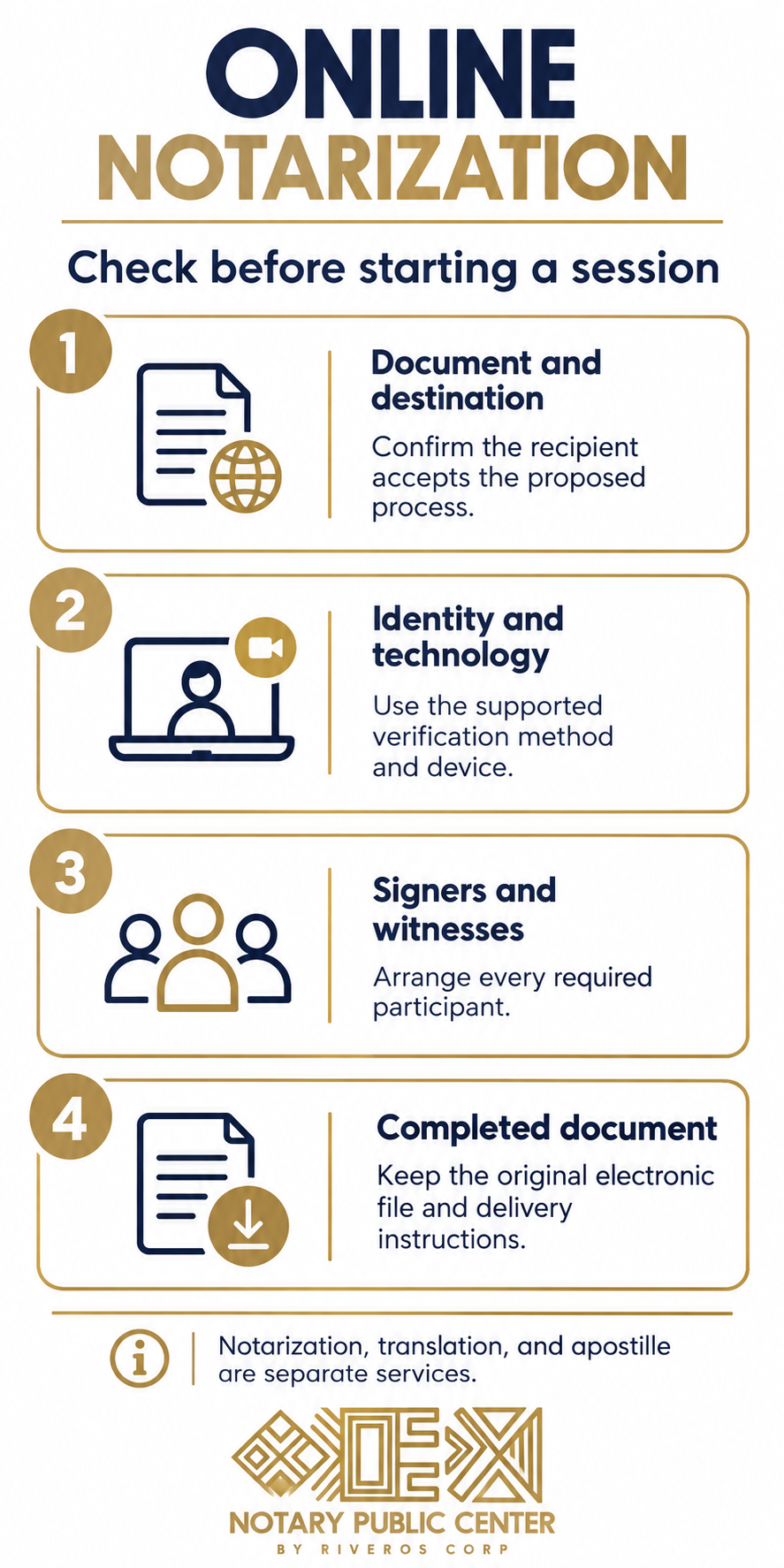
Before starting, confirm that the document and intended use fit the service. Online access does not remove witness requirements, identity checks, or the receiving institution’s review. It also does not include every service a document may need afterward.
This article explains the process and compares it with document coordination through Notary Public Center. The comparison follows the providers’ stated roles and current platform guidance. Neither option guarantees acceptance of every document.
What the Notarize app does
Notarize provides access to the Notarize Network through Proof’s platform. The process combines document preparation, identity verification, and a live meeting with a notary. The notary performs the appropriate act during that meeting.
The completed file contains an electronic notarial certificate and signature. Users can then access and share it through the available platform tools. However, the legal effect depends on compliance with the applicable requirements.
A notarial service is different from legal drafting. If the document lacks the necessary authority or the signer needs advice about its consequences, a lawyer should address those questions. The platform’s convenience does not replace that review.
Check the document before using the Notarize app
Identify the person or institution that will receive the document. Ask whether the proposed electronic process meets the requirements for the particular transaction. Where a bank, lender, or title company supplies instructions, review them before opening a separate transaction.
Next, confirm the required notarial act. An acknowledgment and a jurat serve different purposes. The recipient or appropriate legal professional should resolve any uncertainty about which act the document needs.
Also identify every signer and witness. A document that requires several participants may need additional coordination. Uploading only one person’s signature page will not provide the complete picture.
How the Notarize app process works
The exact screens can vary by transaction and device. You may upload your own document or enter through an invitation from an organization. Follow the instructions for that specific request.
- Upload the complete document in a supported format, or open the transaction invitation.
- Review the information and identify the people who need to sign or witness.
- Complete the available identity-verification process.
- Join the live meeting and follow the notary’s directions.
- Complete any required payment, then access the finished file.
Proof’s upload guidance supports PDF and DOCX files and emphasizes including the full document. Therefore, review the preview for missing pages or unreadable text. Resolve substantive errors before the session rather than asking the notary to rewrite the document.
Allow time for more than the video call
A short meeting does not mean every file takes the same total time. Document preparation, identity verification, witness availability, and technical issues can affect the process. A published average is not a promise for an individual transaction.
If a deadline matters, work backward from the recipient’s requirements. Include any legal review and delivery steps. The original article’s fixed completion estimate did not account for those variables.
Identity verification in the Notarize app
Proof describes several identity-verification methods. Availability depends on factors including the notary’s commissioning state and the transaction. Consequently, it is inaccurate to say that every signer always follows an identical question-based process.
Some transactions use credential analysis and knowledge-based questions. Others may use a permitted alternative, such as an approved identity-assurance process. A credible identifying witness is available only where the platform configuration and applicable rules allow it.
Provide accurate information and follow the supported process. If verification fails, contact support about the available options. Do not assume that a passport, Social Security number, or other single item guarantees eligibility in every workflow.
Identifying witnesses and document witnesses differ
A credible identifying witness helps establish who the signer is. A document witness observes execution of the document. These roles have different purposes and qualifications.
Proof’s guidance distinguishes them and limits how they may participate. Therefore, do not assume that one person can fill both roles. The session needs the participants required for the specific transaction.
Devices, browsers, and the mobile app
A supported device needs a working camera, microphone, and reliable internet connection. Proof recommends a compatible browser and publishes current software requirements. Check those requirements before the appointment if the device or operating system is older.
The mobile app does not support every transaction. Proof states that real estate closings must use a browser rather than the Notarize app. A mobile browser can still be an option where the transaction supports it.
Also test whether the camera can capture readable identification. Poor lighting or a weak connection may interrupt the process. Technical support can address platform problems, while the document sender should answer questions about the transaction itself.
Is a notarization through the app legally valid?
Remote online notarization depends on the law governing the notarial act and the required procedures. The notary’s commission, location, authorization, and conduct matter. The signer’s residence alone does not determine the answer.
For example, Florida permits its online notaries to perform eligible acts while physically in Florida even when the principal is elsewhere. The statute also imposes identification and recording requirements. Other jurisdictions have their own rules.
Recognition of an out-of-state notarization is a separate question from whether a state commissions its own online notaries. Therefore, an article should not treat those two issues as interchangeable. Counsel can assess a specific legal dispute or unusual transaction.
Documents and witnesses
Common requests involve affidavits, business records, powers of attorney, and transaction documents. However, a document’s category alone does not establish eligibility. The particular language, participants, law, and recipient requirements still need review.
Proof offers document-witness options, including on-demand witnesses in supported transactions. It also allows participants to bring eligible witnesses under its rules. Thus, it would be misleading to describe the platform as having no witness support.
Some powers require additional safeguards or physically present witnesses. Our guide to online power of attorney signing explains why the notary and witness arrangements need separate attention.
Spanish-language support on the Notarize app
Proof’s help guidance offers a Spanish-language notary option at the meeting stage. The signer can request the next available Spanish-speaking notary. Availability may affect the waiting time.
Therefore, Spanish support should not be presented as a feature available only through Notary Public Center. The more useful comparison concerns the document, communication needs, and services required before or after signing.
A Spanish-speaking session also differs from a certified translation. If the recipient needs a written translation, arrange that service separately. Our article on a power of attorney in Spanish explains related language issues.
Using the Notarize app for documents abroad
Proof’s current geographic-use guidance states that its platform is intended for documents used within the United States. It tells users not to use the platform for documents intended for use abroad and recommends a traditional notary for those matters.
That is different from a signer who is physically overseas but preparing a document for U.S. use. The platform describes options for eligible signers abroad, subject to its identification and transaction requirements. Do not confuse the signer’s location with the document’s destination.
For international use, confirm the required signing and authentication route before starting. An apostille or other authentication may be necessary, but it cannot automatically cure an unsuitable process. The destination may also require a particular translation or form.
Security and the completed electronic file
Proof describes digital signatures, tamper-evident documents, and a video record of the session. These features help recipients verify the electronic record. They do not establish that every statement in the underlying document is true.
Keep the original completed electronic file. Printing it produces a paper representation that may not preserve the same verification features. Therefore, ask the recipient which format it needs before sending only a printout.
Also protect access to the account and document links. A notarized file may contain sensitive personal information. Follow the provider’s sharing controls and send the finished document only to its intended recipients.
Notarize app and Notary Public Center: compare the task
Notarize offers an online platform and notary network for eligible transactions. Notary Public Center coordinates eligible online or in-person notarization and related document services. A useful comparison starts with the work the client needs.
| Need | What to confirm before choosing |
|---|---|
| Online notarization for U.S. use | Document eligibility, identity verification, participants, and recipient requirements |
| Spanish communication | Availability of the appropriate language support and any separate translation |
| In-person signing | Location, witness arrangements, identification, and scheduling |
| International use | Required notarization, authentication route, translation, and destination acceptance rules |
| Legal drafting or advice | Assistance from a professional licensed for the legal matter |
Notary Public Center can discuss coordination needs before arranging a service. However, no comparison should promise that one provider always produces a faster or more acceptable result. The document and circumstances control.
Compare fees by the services included
A quote may include notarial acts, additional signers, witness participation, or other provider services. Translation, authentication, and delivery may be separate. Therefore, compare the full scope rather than a single advertised component.
Florida distinguishes fees for online notarial acts from other provider services. Applicable requirements also vary across jurisdictions. Our guide to power of attorney service costs explains how to review an itemized proposal.
Before scheduling, clarify cancellation, retry, and rescheduling terms with the provider. An incomplete document or failed verification can prevent completion. The applicable service terms determine what happens next.
What to do if a recipient raises a problem
Ask the recipient to identify the specific concern. It may involve the document’s authority, a missing participant, the file format, or the notarial certificate. A rejection does not automatically prove that the notary lacked authorization.
Next, direct the issue to the appropriate professional. Platform support can address access or technical problems. The notary can address questions about the act, while counsel should review legal sufficiency or a disputed acceptance requirement.
Avoid altering the completed certificate or signed file yourself. Changes can affect verification and legal use. Preserve the original and follow the appropriate correction process.

How Notary Public Center can help
Notary Public Center can assess the practical signing requirements and coordinate eligible services. Share the complete document, intended destination, and any recipient instructions. Also identify the participants, language needs, and proposed signing location.
The team can discuss online or in-person arrangements and any related translation or authentication. Our guide to where to notarize a power of attorney provides further examples of signing options.
Legal advice remains a separate professional service. A notary cannot select legal powers or guarantee that an institution will accept every document. Resolving those questions before the appointment helps define the appropriate work.
Notarize app: common questions
Are Notarize and Proof related?
Yes. Notarize is a service offered through Proof, which provides the platform. Users may encounter either name while accessing a transaction or support information.
Can I use the mobile app for a real estate closing?
Proof’s current instructions require a browser for real estate closings. The mobile app does not support those transactions. Follow the lender or title company’s specific invitation and requirements.
Does the platform offer Spanish-speaking notaries?
Yes. Proof describes an option to request the next available Spanish-speaking notary. Waiting time depends on availability. A Spanish-language session does not automatically include a certified written translation.
Can I use Proof for a document intended for another country?
Proof’s current guidance says not to use its platform for documents intended for use outside the United States. Confirm an appropriate alternative signing and authentication route before proceeding.
Does every signer answer the same identity questions?
No. Proof supports several verification methods, and availability depends on the transaction and applicable rules. Follow the method offered for your session and contact support if you cannot complete it.
Is an apostille included in online notarization?
No. Notarization and authentication are separate procedures. Whether an apostille or another route is necessary depends on the document’s destination. Confirm those requirements before selecting the signing process.
Discuss your document before scheduling
Contact Notary Public Center to discuss the document, destination, and signing arrangements. Call +1 305-507-8464 or use WhatsApp. The team can assess the eligible notarial and related document services.
This publication provides general information, not legal advice. Platform features and requirements can change. Verify the current instructions for the transaction; notarization does not guarantee legal sufficiency or acceptance.