If you’re searching how to complete and notarize form 1583 for a mailbox or virtual address, you want a fast path that the CMRA will accept the first time—no bounce backs. At Notary Public Center, we handle USPS Form 1583 every day. You can visit our Miami office or sign online via Florida-compliant Remote Online Notarization (RON). We ask you to pre-fill Form 1583 except the signature block, verify your identity through layered checks, run a recorded ceremony, and deliver a tamper-evident notarized document that your CMRA can file with confidence. Below you’ll find a practical guide to what Form 1583 is, who needs it, how to fill it, what IDs qualify, and how our online notarization works step by step.
What is USPS Form 1583 (and who needs it)?
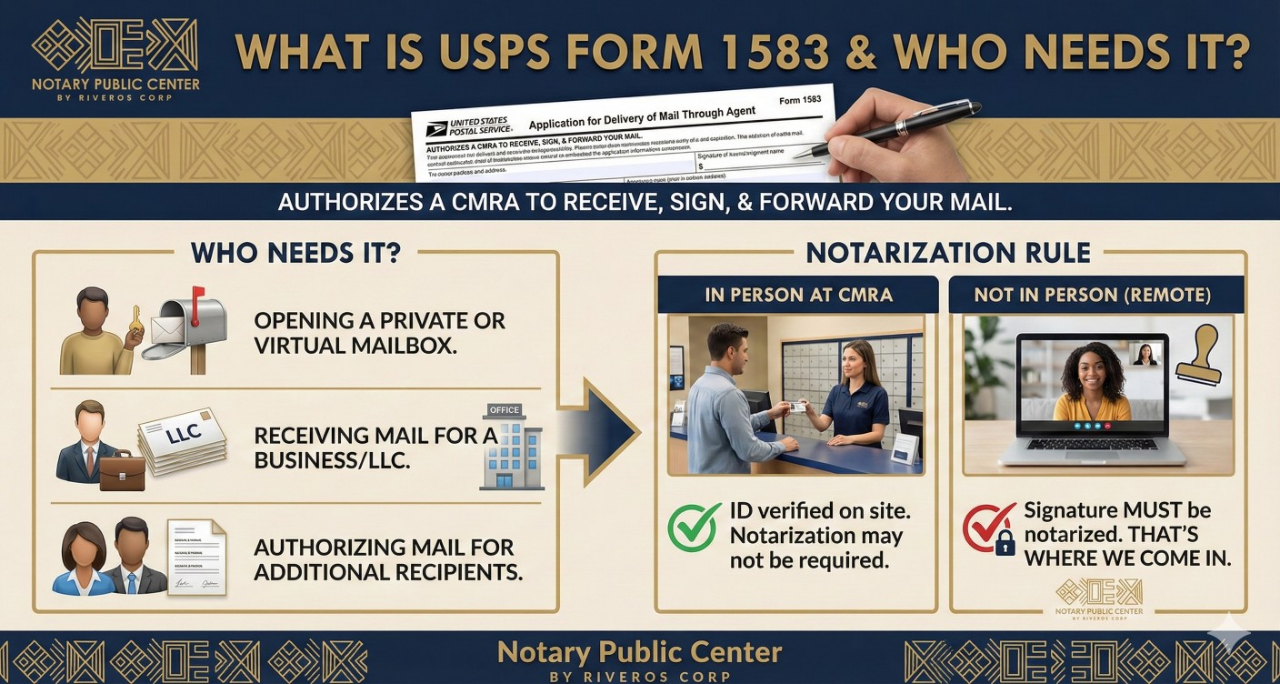
USPS Form 1583 is the “Application for Delivery of Mail Through Agent.” It authorizes a CMRA (e.g., mailbox store, shipping center, or virtual mailbox operator) to receive, sign for, and forward your mail. Most CMRAs will not open your account until they have a properly completed Form 1583 on file, along with ID copies and, for business accounts, documentation linking the applicant to the business.
You’ll need Form 1583 if you’re:
Opening a private mailbox or a virtual mailbox service.
Receiving mail for a business/LLC/DBA at a CMRA address. (Note: If you haven’t registered your US LLC yet, our partner Riveros Corp can handle the formation before you set up your mailbox.)
Authorizing the CMRA to handle mail for additional recipients (e.g., spouse, business partners, brand names).
If you appear at the CMRA in person, they typically verify your ID on site and may not require notarization. If you don’t appear in person (for example, you’re out of state or using a virtual mailbox), the signature on Form 1583 must be notarized. That’s where we come in.
Before we meet: fill Form 1583 except the signature
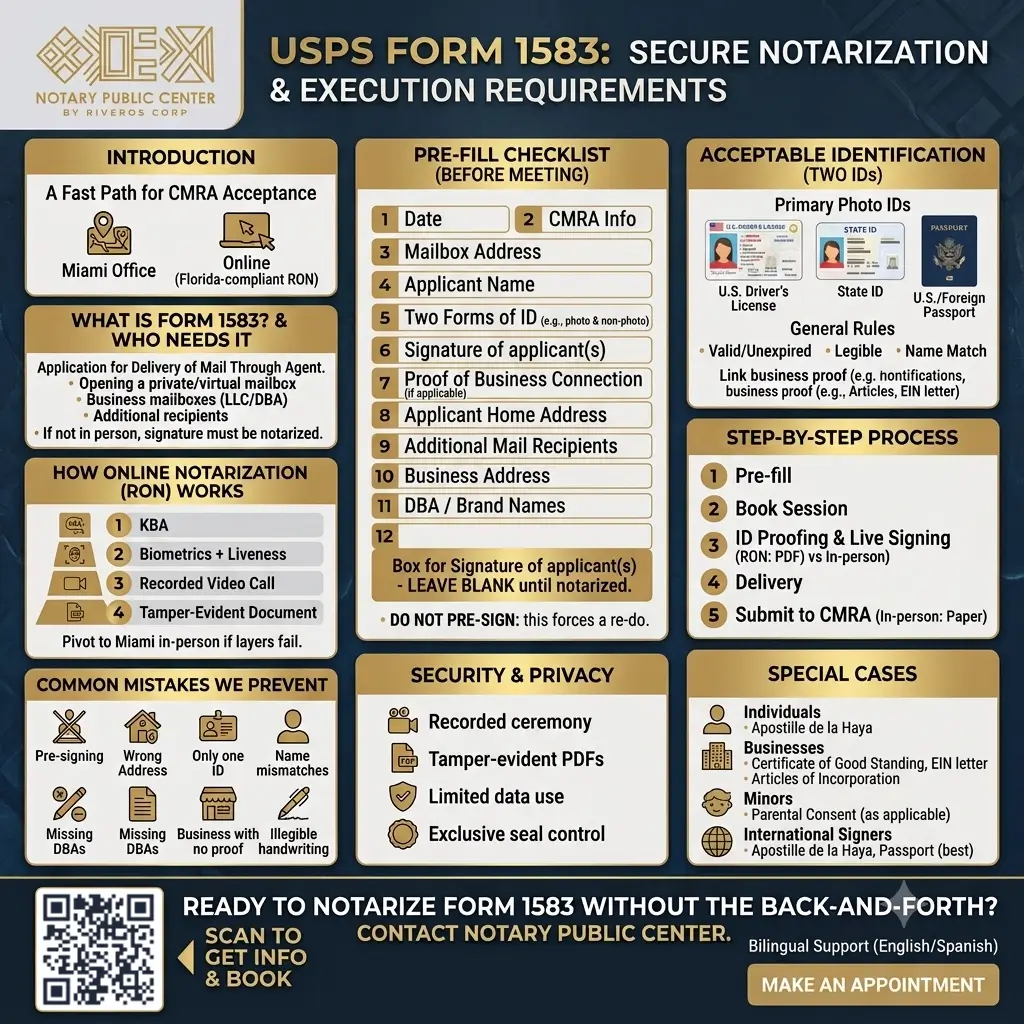
To keep you compliant and efficient, please complete the entire Form 1583 except the signature line. You must sign in our presence (for in-person notarization) or live during the video call (for online notarization). Pre-signing will force us to re-do the form.
Quick pre-fill checklist
Box 1 — Date.
Box 2 — CMRA name and address (your mailbox provider’s info).
Box 3 — The mailbox address you’re renting (street, suite/PMB).
Boxes 4–7 — Applicant’s name, home address (no P.O. Boxes), contact info.
Boxes 8–9 — Two forms of ID (see “Acceptable IDs” below). One must have a photo.
Boxes 10–11 — Additional recipients at the mailbox (spouse, children, business names, brand/DBA).
Box 12 — For business use: business/LLC/DBA name, address, and type of business.
Box 13 — Business owner(s) or officer(s) info; attach proof linking you to the business (LLC Articles, EIN letter, DBA filing, etc.).
Box 14 — Signature of the CMRA (your mailbox provider completes this portion after they accept your application).
Signature of applicant(s) — Leave blank until we notarize with you.
If you’re unsure how your CMRA wants the “PMB/Suite” field shown, ask them before notarization. Different operators format it differently and may reject otherwise perfect forms over formatting.
Acceptable identification for form 1583 (two IDs required)
Most CMRAs follow USPS guidance: forms of ID, and at least one must include a photo. Common combinations:
Primary photo ID (choose one)
U.S. driver’s license
U.S. state ID
U.S. or foreign passport
U.S. military ID (some platforms cannot scan—ask us first)
U.S. permanent resident card (where permitted)
General rules that help everywhere
IDs must be valid (unexpired) and legible.
The name must match what you write on Form 1583 (including middle names/initials if present on the ID).
For foreign signers, a passport is best (machine-readable with Latin characters).
You will typically attach copies of the two IDs when you send the form to your CMRA. For online notarization, we also capture your ID as part of credential analysis.
For business mailboxes, many CMRAs ask for proof of the business (e.g., Articles of Organization, certificate of good standing, EIN letter, or DBA filing). Bring a PDF of at least one linking you (the applicant) to the entity.
How our online notarization (RON) works for Form 1583
Notary Public Center offers Remote Online Notarization (RON) that is fast, secure, and widely accepted by mailbox providers. Here’s our four-layer identity process:
KBA (Knowledge-Based Authentication)
You answer time-limited questions based on public/credit records tied to you. This proves the person on camera knows personal history only you should know.Biometrics + liveness
The platform verifies that you are physically present—not a replay video—and that your face matches the ID image.Recorded video call (two-way)
We meet live by audio/video; the entire ceremony is recorded. You sign Form 1583 on camera, we complete the notarial certificate, and your notarized PDF becomes tamper-evident—any post-signing change shows as modified/invalid in standard PDF viewers.
If a layer fails, we troubleshoot (better lighting, a different ID, etc.). If the platform still can’t verify, we pivot to a Miami in-person appointment so you don’t lose time. Timeframes may vary by scheduling and holidays, but once acceptance is confirmed, the RON session itself is typically quick.
Step-by-step: notarize Form 1583 with Notary Public Center
- Pre-fill the form
Complete all fields except your signature. Add two IDs in boxes 8–9, and list all names/DBAs that will receive mail. For business, attach proof linking you to the entity. Book your session
Choose online (RON) or in-person (Miami). For RON, have your ID ready and good lighting.Identity proofing & live signing
We run credential analysis + KBA + liveness, then launch the recorded video call. You sign Form 1583 while we watch. We finalize the notarial certificate.Delivery
For RON, you receive a tamper-evident notarized PDF immediately after the session. If your CMRA wants paper, we provide the original via courier/mail. For in-person, you walk out with the wet-ink notarized form.Submit to your CMRA
Send the notarized Form 1583 plus ID copies (and, for business, proof of entity) exactly as your provider requires. Some want uploads; others want mail-in packages. We’ll remind you of their instructions so your account opens without delay.
Common mistakes we prevent (so your CMRA doesn’t reject the file)
Pre-signing the form — The signature must happen during notarization. If you sign early, we must redo the form.
Wrong address in Box 5 — Your home/residential address is required; do not list a P.O. Box.
Only one ID — You need two IDs; at least one photo ID.
Name mismatches — The name on Form 1583 must match your ID. Pay attention to middle names, accents, apostrophes, and hyphens.
Leaving off DBAs/brand names — If mail will arrive under a trade name, put it on the form.
Business with no proof — If it’s a business mailbox, attach a document linking you to the entity.
Illegible handwriting — Many CMRAs still scan and store paper; write clearly in dark ink or type the form before printing.
Security and privacy
Recorded ceremony — Your session is recorded and stored per rule. It documents the ID checks, the moment of signing, and the notarial act.
Tamper-evident PDFs — Any change after signing triggers a visible “modified/invalid” warning in common PDF viewers.
Limited data use — We use your information only to complete the notarization and comply with recordkeeping duties.
Exclusive seal control — Only commissioned notaries control the electronic seal and signature.
Special cases: individuals, businesses, minors, and international signers
Individuals (personal mailbox)
Make sure every person who will receive mail is listed—spouse, partner, or children (if the CMRA allows it). Each adult recipient generally provides two IDs. Ask your CMRA about minors; many require the parent/guardian information.
Businesses (LLC, Corp, DBA)
In Box 12, list the entity name and type of business.
In Box 13, list the officer(s)/owner(s) and provide proof (Articles, good standing certificate, EIN letter, or DBA filing).
Decide which DBAs/brand names should receive mail and list them.
International signers
Online notarization usually works well with a foreign passport as the photo ID. If you plan to use your notarized documents or business filings outside the US later, remember that Apostille de la Haya can certify them for international validity.. KBA uses U.S. data and may be challenging if you have thin U.S. history; if KBA fails, we can switch to in-person notarization when you’re in Miami or explore a second attempt with different inputs. Always confirm that your CMRA accepts online notarization issued under Florida law (most do).
What happens after notarization?
If your CMRA accepts e-notarized PDFs: upload the notarized Form 1583 plus PDF copies of your IDs (and business proof).
If your CMRA requires wet-ink originals: mail or drop off the paper notarized form and ID copies as directed.
Account activation: once the CMRA checks your packet, they finalize your mailbox. Timeframes may vary by provider and season.
Keep a copy of your notarized form and the ID pages you submitted. Some providers ask for re-verification after policy updates.
Why choose Notary Public Center for Form 1583
Two modes: online notarization (RON) anywhere or in-person in Miami.
Identity layers online: credential analysis, KBA, biometrics/liveness, and a recorded video call.
Error-proofing: we verify acceptance with your CMRA, catch ID/name mistakes, and make sure you sign during the session.
Fast delivery: tamper-evident PDF for online sessions; wet-ink original available when required.
Bilingual support: English/Spanish help for individuals and businesses.
Ready to notarize Form 1583 without the back-and-forth? Contact Notary Public Center. Send us your completed—but unsigned—Form 1583, have two IDs ready, and book online or in person (Miami). We’ll run the identity checks, oversee a recorded signing, and deliver a tamper-evident notarized form your CMRA can accept the first time.
FAQ
1. What is the purpose of USPS Form 1583?
This document is a mandatory federal form required by the United States Postal Service. It legally authorizes a Commercial Mail Receiving Agency (CMRA)—such as a virtual mailbox provider or a registered agent—to receive, open, and forward postal mail on your behalf.
2. Can I get my Form 1583 notarized online?
Yes. You do not need to physically visit a post office or a local notary. Through secure Remote Online Notarization (RON), Notary Public Center can safely and legally verify your identity and notarize your document over a secure audio-video session from anywhere in the world.
3. Do non-U.S. residents need to notarize Form 1583?
Yes. If you are a foreign national setting up a U.S.-based virtual mailbox or business address, you must still complete and notarize this document. Our RON services are highly utilized by international clients who can use their valid foreign passports as primary identification during the digital notarization process.
4. What happens if I use the wrong IDs for the notarization?
If the notary accepts an invalid ID (such as a credit card or birth certificate) or fails to record the IDs properly in box 8 of the document, the CMRA is legally obligated by the USPS to reject your application. This will completely halt your ability to receive mail.
5. Can the notary help me fill out the form for my specific business structure?
No. A notary public is strictly prohibited from providing guidance on how to complete the document, choosing entity types, or giving legal or business advice. You must have the document completely filled out before the notarization begins; the notary’s sole responsibility is verifying your identity and witnessing your signature.
The information contained in this publication is provided for general informational purposes only and does not constitute legal advice. Reading or using this content does not create and is not intended to create an attorney-client relationship. No reader or user should act or refrain from acting based on the information presented herein without first consulting an attorney duly licensed to practice law in their jurisdiction.